How to Create a Functional Home Workspace on a Budget
Creating a Functional Home Workspace on a Budget can make remote work, studying, and creative projects feel easier without turning one room into an expensive showroom. The right setup is less about matching furniture and more about choosing a supportive chair, a workable desk height, useful lighting, and storage that keeps daily clutter under control.
You can build a comfortable budget home office in stages, starting with what affects your body and concentration most. This article explains how to assess your space, spend carefully, use affordable office furniture, and make practical improvements that support productivity for months rather than just looking good on the first day.
Start With a Clear Budget and a Realistic Plan
A functional workspace does not require a complete furniture package. Set a maximum amount before shopping, then divide it according to need rather than buying whatever catches your eye first.
For many people, the sensible order is chair, desk, lighting, monitor support, and storage. A decorative lamp or matching filing cabinet can wait if your current chair leaves your back aching after an hour.
| Workspace need | Low-cost starting option | Why it matters |
|---|---|---|
| Work surface | Existing table, sturdy desk, or supported tabletop | Provides enough room for your computer and basic supplies |
| Desk chair | Supportive chair already owned or carefully chosen second-hand model | Reduces discomfort during longer sessions |
| Monitor height | Stable books or a simple monitor stand | Helps prevent constant downward neck movement |
| Lighting | Natural lighting plus an adjustable task lamp | Reduces glare and eye strain caused by dim rooms |
| Storage | Boxes, shelves, drawers, or reused containers | Keeps the work surface clear and easier to maintain |
Write down what you already have before spending anything. A dining table may work perfectly as a desk, while a spare side table might serve as a printer stand or supply station.
Use a simple three-question test for every purchase: does it improve comfort, save time, or solve a recurring problem? If the answer is no, leave it off the list until the essential setup is working.
Second-hand marketplaces, office clear-outs, charity shops, and local reuse groups can reduce the cost of a desk or shelving. Inspect used furniture for wobbling legs, damaged fasteners, unpleasant odours, and signs of mould before bringing it indoors.
Choose the Best Location, Even in a Small Home
The best home workspace location is the one you can use consistently without blocking household movement. A corner of a bedroom, a section of a dining area, a hallway alcove, or the end of a living room can all work if the arrangement has a clear boundary.
Measure the available area before buying furniture. Record the wall width, depth, nearby power outlets, door swing, radiator position, and the space needed to pull out a chair.
Small space design depends on clearances more than appearance. A desk that technically fits may still be impractical if you cannot sit comfortably or open a drawer without hitting another piece of furniture.
Use Vertical Space
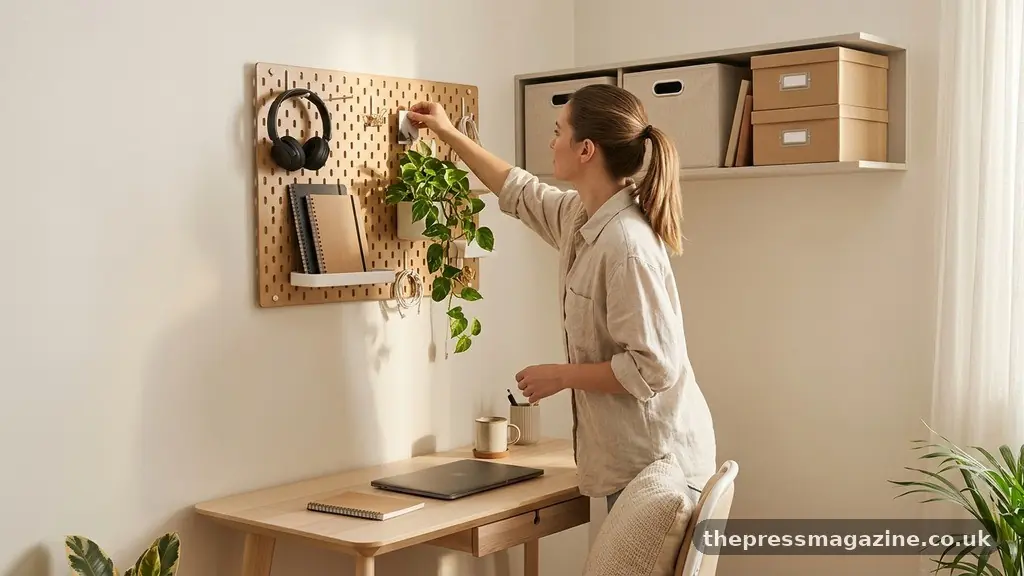
When floor space is limited, look upward. A wall shelf, pegboard, narrow bookcase, or rail with hooks can hold notebooks, headphones, cables, and stationery without consuming the desk surface.
Choose storage that matches your habits. Open shelves make frequently used items visible, while closed boxes are better for supplies that create visual noise.
Create a Work Boundary
A dedicated work boundary helps separate employment or study from personal time. A small rug, folding screen, desk lamp, or consistent end-of-day storage routine can signal that the work zone is beginning or closing.
If your desk must share a dining table, use a portable setup. Keep your keyboard, notebook, charger, and headphones in one container so you can assemble the workspace quickly and clear it completely after work.
Positioning matters, too. Place the screen where windows create the least glare, and avoid putting the desk directly in a busy walkway if people regularly pass behind you during calls.
Spend First on the Desk and Chair
A desk needs enough depth for your screen, keyboard, mouse, and a little writing space. If you use a laptop, a work surface that feels adequate for the computer alone may become cramped once you add a monitor, notebook, or water bottle.
Before buying, test the height with your elbows bent near a right angle and your feet resting on the floor. A desk that is too high encourages raised shoulders, while one that is too low can make you hunch toward the screen.
Affordable office furniture does not have to look like traditional office furniture. A sturdy tabletop on reliable supports, a compact writing desk, or a second-hand office desk may provide more useful space than a trendy desk with built-in decorative features.
Assess a Chair Properly
The desk chair deserves careful attention because it supports you for much of the day. Look for a stable base, adjustable height, a seat that does not press sharply behind the knees, and enough support to let you sit back rather than perch on the edge.
Armrests are helpful only if they fit under or beside the desk without forcing your shoulders upward. If the armrests prevent you from getting close enough to the desk, they may create more difficulty than they solve.
A used chair can be a strong bargain, but check that the height mechanism works and that the wheels, casters, and backrest are secure. Clean fabric carefully and avoid buying a chair with damage that affects its structure.
Improve What You Already Own
If replacing the chair is not possible, add a firm cushion, adjust the height, or use a small rolled towel to support the lower back. These are temporary improvements, not substitutes for a damaged or unsuitable chair.
A footrest can also help if your chair must be raised to match a tall desk. A stable box or low platform may work, provided it does not slide and leaves both feet supported.
Build an Ergonomic Desk Setup Without Overspending
Ergonomics is mainly about arranging equipment so your body can stay relaxed and change position easily. It is not a demand for expensive specialist products.
Keep the monitor roughly an arm’s length away and place the top portion of the screen near eye level. If you work from a laptop, a simple monitor stand or a stack of stable books can raise the display, but use a separate keyboard and mouse so your hands are not forced upward.
The Occupational Safety and Health Administration’s computer workstation advice offers practical reference points for screen position, seating, keyboard placement, and breaks. Use those principles as a starting point, then adjust based on your body and working habits.
Keep the keyboard close enough that your elbows remain near your sides. The mouse should sit beside the keyboard rather than far away, since repeated reaching can create tension in the shoulder and upper arm.
Change Position Regularly
Even a well-arranged desk is not a reason to stay still for hours. Stand during phone calls, walk while waiting for files to load, or take a short movement break between tasks.
Try a simple timer that reminds you to look away from the screen and reset your shoulders. The goal is not perfect posture every second; it is avoiding one rigid position all day.
Do not buy an ergonomic accessory merely because it carries the label. A costly wrist rest cannot correct a desk that is too high, and a fashionable standing mat will not help if you rarely stand.
Use Lighting and Cable Management to Improve Focus
Good lighting makes a budget home office feel more comfortable and can reduce the temptation to lean toward the screen. Start with natural lighting from a window, but position the monitor so sunlight does not reflect directly into your eyes or across the display.
Side lighting is often more useful than placing a bright window directly behind the screen. If the room becomes dark in the afternoon, add task lighting with an adjustable lamp aimed at paperwork or the desk surface.
A lamp with a movable head lets you change the angle as the day changes. You do not need an expensive smart bulb; a suitable bright bulb and a stable lamp can handle the basic job.
Control the Cables
Cable management is one of the cheapest ways to make a workspace feel calmer. Gather wires by function, label unfamiliar chargers, and route them along the rear edge of the desk rather than letting them fall across the floor.
- Use reusable ties or hook-and-loop straps instead of disposable plastic ties.
- Label both ends of chargers that look alike.
- Keep the power strip where it remains reachable for safe shutoff.
- Secure loose wires away from chair wheels and walking paths.
- Leave enough slack for cleaning and for moving the monitor or laptop.
Do not bundle every cable into one tight mass. Power cords, display cables, chargers, and audio leads may need different routes, and overly tight bundles are harder to troubleshoot when something stops working.
A cable box can hide a power strip, but ventilation still matters. Never cover a hot adapter or trap electrical equipment under piles of paper.
Add Storage and DIY Office Organization
Clutter usually grows from small daily decisions: a receipt left beside the keyboard, a notebook placed under the monitor, or a charging cable dropped on the floor. Storage solutions work best when they make the correct action easy.
Keep items used every day within arm’s reach, weekly items in a drawer or shelf, and rarely used supplies somewhere farther away. This simple arrangement reduces unnecessary searching without requiring a large filing system.
DIY office organization can be as basic as assigning one tray for incoming papers and another for documents that need action. A small box for chargers prevents loose wires from occupying the desk, while a cup or jar can hold pens and scissors.
Make the Surface Easy to Reset
Leave a clear area for writing, signing documents, or placing a drink. If every inch is permanently occupied, even a quick task becomes a miniature rearrangement project.
Use a vertical file holder for papers that need attention during the week. At the end of the week, recycle, archive, or act on each item rather than allowing the holder to become a permanent pile.
Choose storage containers that fit the space instead of buying a full set. Reused boxes work well when labelled clearly, and mismatched containers are preferable to a neat-looking system that does not hold what you actually use.
Protect the Work Surface
A desk mat can protect a low-cost tabletop from scratches, but it is not essential. A smooth, clean surface is enough for most keyboards and mice, provided the desk does not wobble.
Keep drinks in a stable container away from electronics. One spill can cost more than the money saved by postponing a simple coaster or bottle with a secure lid.
Reduce Noise and Make the Space Easier to Use
Noise reduction is often overlooked in home workspace planning. You may not be able to make a room silent, but you can reduce interruptions and soften distracting sounds.
Place the desk away from televisions, kitchen appliances, and doors that open frequently. A thick rug, curtain, or book-filled shelf can absorb some reflected sound, while a closed door provides a clearer boundary during meetings.
For calls, test your microphone before buying equipment. Moving the microphone closer to your mouth and lowering background volume may improve call quality more than purchasing a costly headset.
Noise-cancelling headphones can help in a busy home, but they should be used thoughtfully. Keep enough awareness of alarms, children, pets, and other important sounds, especially if you are responsible for the home while working.
Plan for Shared Rooms
If another person uses the room, agree on simple signals for meetings and concentration. A small card, lamp, or closed door can communicate that interruptions should wait unless something is urgent.
Shared spaces benefit from furniture that can be folded or moved. A compact rolling cart can hold work-from-home essentials during the day and be pushed beside a wall at night.
Think about sound from your side as well. Keep calls at a reasonable volume, use headphones when appropriate, and avoid placing a noisy printer directly beside the person trying to concentrate.
Choose Technology That Solves a Specific Problem
Technology can improve productivity, but only when it removes a genuine obstacle. A second monitor may help someone comparing documents, while it may simply create more visual clutter for a person who mostly writes in one application.
Start with reliable internet, a charger that reaches the desk safely, and a keyboard or mouse that feels comfortable. Those basics matter more than decorative gadgets or devices purchased because they appear in polished workspace photographs.
A laptop stand can improve screen height, but remember that it changes the keyboard position. Pair it with an external keyboard if you use the computer for long sessions.
Use software to reduce small interruptions. Calendar blocks, notification controls, password management, and automatic file backups can save time without taking up physical space.
Build in Maintenance Time
A functional workspace is maintained through small routines. Spend two minutes at the end of a workday returning the mouse, closing notebooks, filing loose papers, and putting chargers back in their assigned place.
Once a week, wipe the desk, inspect cables, empty the paper tray, and remove items that have migrated into the area. This prevents a minor mess from becoming a full reorganisation project.
Review the setup after two weeks of use. Notice where you reach repeatedly, which supplies remain hidden, and whether your chair or monitor position causes discomfort; then make one targeted change instead of replacing everything.
FAQ: Practical Questions About a Budget Workspace
How much does a functional home workspace cost?
There is no single required amount because the cost depends on what you already own. Using an existing table, a suitable chair, books as a monitor stand, and natural lighting can keep initial spending low, while replacing several major items will require a larger budget.
Prioritise the chair, work surface, and screen position before decorative accessories. Buy one improvement at a time and wait long enough to see whether it solves the problem.
Can a dining table work as a desk?
Yes, a dining table can work well if its height lets you use the keyboard without lifting your shoulders and if there is enough depth for the screen and input devices. Check that you can sit with your feet supported and that the table does not force the monitor too far away.
Because dining tables are often shared, use a portable storage container for your daily equipment. That makes clearing the table faster and protects work materials from being mixed with household items.
What should I buy first for a budget home office?
Buy or improve the item causing the greatest daily discomfort first. For many people that means a supportive desk chair, but someone with a good chair and a poorly positioned laptop may benefit more from a monitor stand and separate keyboard.
After that, address lighting and cable safety. Decorative storage, artwork, and matching accessories can wait until the workspace performs well.
How can I make a small workspace feel less cramped?
Keep only frequent-use items on the desk and move the rest to vertical or nearby storage. A clear work surface creates more usable space than a larger desk covered with supplies.
Choose equipment with more than one purpose, such as a narrow shelf that stores books and raises a monitor, or a rolling cart that can be moved away after work. Avoid buying furniture that blocks doors, windows, or walking routes.
Is a standing desk necessary?
No. Changing position is useful, but you can stand during calls, take movement breaks, or use a stable raised surface for short periods without buying a standing desk.
If you try a raised setup, check that the keyboard remains comfortable and that the screen does not force your neck upward. Stability matters more than fashion, so do not stack equipment on an unstable pile of boxes.
Conclusion
Creating a Functional Home Workspace on a Budget starts with careful observation rather than a shopping spree. Measure the space, use what you own, improve the chair and screen position, add suitable lighting, and organise cables and supplies so everyday work takes less effort.
Make one change this week, then assess how it affects comfort and productivity before spending again. A modest desk in a well-planned corner can serve you better than an expensive office filled with items that do not match your routine.


